Wednesday, May 23, 2012

Basic HTML

How to create:
-Headings
 <h1>This is a heading</h1>

-Background colours
<body style="background-color:yellow">

-Paragraph break
<p>This is a paragraph.</p>
<p>This is another paragraph.</p>


-Line break
<p>This is<br />a para<br />graph with line breaks</p>

-Bold font

<b>
 Comments 
<!-- This is a comment -->

Change Font and color
<h1 style="font-family:verdana;">A heading</h1>
<p style="font-family:arial;color:red;font-size:20px;">A paragraph.</p>
</body>
The text on your page must be used to explain;

Colours and codes for HTML
Color Color HEX Color RGB
#000000 rgb(0,0,0)
#FF0000 rgb(255,0,0)
#00FF00 rgb(0,255,0)
#0000FF rgb(0,0,255)
#FFFF00 rgb(255,255,0)
#00FFFF rgb(0,255,255)
#FF00FF rgb(255,0,255)
#C0C0C0 rgb(192,192,192)
#FFFFFF rgb(255,255,255)

Monday, May 21, 2012

Using Frontpage

Using http://office.microsoft.com/en-us/frontpage-help/overview-RZ001114106.aspx?section=1.
    1. What two steps are recommended in planning your site?
    -Planning your site structure with sketches
    -Planning your site layout again with sketches.
      2. What is a web server?
      A Web server is a computer that runs special serving software. That software "serves" HTML pages and associated files when requested by a client, such as a Web browser.

      3. Provide examples of some features that FrontPage Server Extensions provide for a website?
      Design element Interactives
      Security- Log in.
      Allows direct uploads and downloads of data and files

      4. How do you put your website on a web server?
      To put your site on a Web server, you publish it. Publishing generally means copying all of the files to a remote location on a server. In most cases, the remote location is either an HTTP path or an FTP path. The path you use depends on what technologies your server supports.

      5. FrontPage has two key functions – website design and management

      6. What are some commonly used file names for Home Pages accepted by servers?

      7. What is FrontPage Metadata and which two folders contain these files?
      FrontPage metadata is information about your FrontPage Web site that makes managing the site possible.
      The folders are the _vti_cnf folder and the _vti_pvt folder.

      8. There are two basic types of website can you create in FrontPage; what are they and how do they differ?
      Disk-Based and Sever-Based.
      A disk-based site is a FrontPage Web site you create on your local hard disk and then later publish to a Web server. A server-based site is one you create and work with directly on a Web server, without the extra step of publishing.


        Wednesday, May 16, 2012

        Internet Addresses


        1.    What is a URL?
         Uniform (or universal) resource locator, the address of a World Wide Web page.

        2.    What is an IP address and how is it related to a URL?
        The browser communicated with a name server to translate the server name "www.google.com.au" into an IP Address, which it uses to connect to the server machine. The browser then formed a connection to the server at that IP address on port 80.
        3.    Given our school website's URL is http://www.mcauley.nsw.edu.au, what is our domain name and what protocol do you need to use to access the site?
        Domain Name: mcauley.nsw.edu.au
        Protocol: 'http' (hypertext transfer protocol)

        4.    In the context of an IP address, what is an octet?
        IP stands for Internet protocol, and these addresses are 32-bit numbers, normally expressed as four "octets" in a "dotted decimal number." The four numbers in an IP address are called octets because they can have values between 0 and 255,

        Broadband Speedtest
        For a bit of fun determine the speed of our internet connection using the site below. Start by testing the connection speed to the Sydney location then select a different location from the map (drag the map to find a location).


        Home Computer = 0.50 Mbps
        1. What is meant  by upload and download speeds?
        Uploading involves sending a copy of a file from a computer to a remote network connection; for instance, Web developers and publishers upload files to their Web server to make them available for other people to access.
        Downloading involves the reception of a file that has been uploaded to a remote network. Often this refers to a person copying a file from a remote network to her personal computer; for example, people download music from iTunes after they make a purchase.

        Upload speed is usually slower than download speed because Internet providers have designed their systems to optimize download speeds. This is because most Internet users spend more time downloading than uploading. In other words, Internet providers give priority to downloading since it's more frequently done than uploading

        2. What are the units used to measure download speeds? 
        Mbps (mega bits per second)  or Kbps (Kilo bits per second)

        3. Why do different locations offer different download speeds? Hint: “bottleneck”
        There are various reasons for different speeds:
        - cables, they type of material used,optic fibre- copper wire-whether the server is wireless 
        -crowds/No. of users eg townhouse
        -Amount of data being uploaded/downloaded 
        -Bottleneck- Size of channels/branches
        -The weather can affect some wireless channels
        -Time of day
        -Usage


        'Bottlenecks' reduces the room data has to travel therefore reducing the speed it is transmitted at.

        Sunday, May 13, 2012

        • How did the internet originate?
          The interenet was first created in 1968 in America.
          In 1957 a remote connection had to be developed so the people could work on the computers despite the fact that they had to be stored in a cold room. At the same the idea of 'time-sharing' came up allowing multiple users to work on one computer. They created a system where knowledge could be transfered faster. Universities were cautious about letting others use their computers so they had a smaller computer, commonly termed the 'Interface' which took over control of network activities. The IMP's connected to other interfaces called the Network Control Protocol. This was later replaced by the more efficent TCP 'Transmission Control Protocol". The NPL Network was expected to support many users and file transfer. The idea that files should be split up came in to play to avoid 'congestion'. This was called packet switching. Upon discovery of a possible atomic bomb attack they created a "de-centralised' network so that if a station was hit the network wouldn't be destroyed. The creation of the french CYCLADES was another milestone. They (with their low budget) had to focus on connecting with other networks.
          TCPIP Transmission control protocol internet protocol.
          Who were the people most responsible for creating it?
          The Internet was originally created by DARPA (the Defence Advanced Research Projects Agency) as a means of sharing information on defence reseacrh between involved universities and defence research facilities.The internet was not created by a single person, however here are some people who made large contributions:
          ARPANET (Advanced Research Projects Agency Network).
        • The idea-Leonard Kleinrock's
          People such as- Elmer Shapiro, Steve Carr, Steve Crocker, Jeff Rulifson, Ron Stoughton, Paul Baran, Thomas Marill, Lawrence Roberts, Barry Wessler, Bolt Beranek and Newman, Inc. (BBN)


          What system immediately preceded the internet? What was its purpose?

          Lee had actually begun networking computers before the development of the PC, with his Community Memory project in the late 1970s. This system had terminals (like computer screens with keyboards connected to one large computer that did the processing). These were placed in laundromats, the Whole Earth Access store, and community centres in San Francisco. This network used permanent links over a small geographical area rather than telephone lines and modems.

          What is an IP packet? What is it comprised of?
          IP packet is the basic data chunk that can be sent over the Internet. All the data is partitioned into IP packets on the sending computer and reassembled on the receiving computer. Each packet contains header information that includes the type of traffic it is (FTP or UDP, for example) and where it originated from.

          What does TCP stand for? How does TCP deal with lost IP packets?
          Transmission Control Protocol over Internet Protocol. These are two transmission protocols that work together to help the servers, clients and devices on the network talk to one another.
          Why do computer people like everything in letters?
          They may prefer it because acronyms are easier to remember, as well as shorter to type and refer to.


          Sunday, April 1, 2012

          Some Key Terms- Internet and Web Design

          1. Define the term - Protocol:When computers communicate with each other, there needs to be a common set of rules and instructions that each computer follows. A specific set of communication rules is called a protocol.
          2. What are the following protocols used for?

          TCP/IP: Stands for "Transmission Control Protocol/Internet Protocol." These two protocols were developed in the early days of the Internet by the U.S. military. The purpose was to allow computers to communicate over long distance networks. 

          http: Stands for "HyperText Transfer Protocol." This is the protocol used to transfer data over the World Wide Web. That's why all Web site addresses begin with "http://". Whenever you type a URL into your browser and hit Enter, your computer sends an HTTP request to the appropriate Web server.

          SMTP: Stands for "Simple Mail Transfer Protocol." This is the protocol used for sending e-mail over the Internet. Basically, SMTP is a set of commands that authenticate and direct the transfer of electronic mail.

          POP: Stands for "Post Office Protocol." "POP" is a simple, standardized method of delivering e-mail messages. A POP mail server receives e-mails and filters them into the appropriate user folders. 

          FTP: Stands for "File Transfer Protocol." It is a common method of transferring files via the Internet from one computer to another. 

          1. What does GUI stand for? What was used before GUI? Stands for "Graphical User Interface". It refers to the graphical interface of a computer that allows users to click and drag objects with a mouse instead of entering text at a command line.  The graphical user interface was first introduced to the public by Apple with the Macintosh in 1984. However, the idea was actually taken from an earlier user interface developed by Xerox. Early dynamic information devices such as radar displays, where input devices were used for direct control of computer-created data, set the basis for later improvements of graphical interfaces.

          4. There are two methods of data transmission – serial and parallel. Explain the difference between them.
          Serial transmits data one bit at a time as it only is connected by one wire whereas parallel transmits anything up to a byte at a time if connected by 8 wires.
            5. Define the term “URL”. Explain the components that make up the url.
              Stands for "Uniform Resource Locator". A URL is the address of a specific Web site or file on the Internet. A URL is used when a Web client makes a request to a server for a resource. A URL for HTTP (or HTTPS) is normally made up of three or four components:
              1. A scheme. The scheme identifies the protocol to be used to access the resource on the Internet. It can be HTTP (without SSL) or HTTPS (with SSL).
              2. A host. The host name identifies the host that holds the resource. For example, www.example.com.
                Host names can also be followed by a port number. Well-known port numbers for a service are normally omitted from the URL. Most servers use the well-known port numbers for HTTP and HTTPS , so most HTTP URLs omit the port number.
              3. A path. The path identifies the specific resource within the host that the Web client wants to access.
              4. A query string. If a query string is used, it follows the path component, and provides a string of information that the resource can use for some purpose (for example, as parameters for a search or as data to be processed). The query string is usually a string of name and value pairs, for example, q=bluebird.
            6. In the context of data transmission, what is “error detection”? 
            It is simply the searching for an detection of any errors that may have occurred in the sending of data
            7. Why would error detection be important for the internet
              8. Name and explain one common method of error detection.
              The oldest method of error correction involves using parity. It works by adding an additional bit to each character word transmitted. The state of the bit is determined by a number of factors such as the type of parity and the number of logic-one bits in the data character.


               *A parity bit is a bit that is added to ensure that the number of bits with the value one in a set of bits is even or odd. Parity bits are used as the simplest form of error detecting code.
                9. What is HTML and explain why it is important
                  HTML stands for Hyper Text Markup Language; HTML is not a programming language, it is a markup language. HTML is what formats web pages. It is used in conjunction with JavaScript and CSS to make the page you see. It is used to format the text, layout, images, links, etc. The combination of these three elements has come to be known as XHTML.

                Monday, March 12, 2012

                To get a Paramter Query to open in form view

                As with every other task the worksheet was designed to suit microsoft 2003 therefore meaning that i spend most of time trying to figure out where various buttons have disapeared to.

                Through editing the worksheet, it is now (once I've finished!) easier to understand. The task requires a few various steps to reach the rquired point.

                After creating the menu form and setting it as the opening page you can add a button that opens a parameter query.

                Sunday, March 4, 2012

                Creating A parameter query

                Parameter queries are useful to find infomation quickly and efficiently.

                To create the parameter query use have to:
                -Create a query using query design and chose the fields you want to be shown.
                -In the criteria box paste
                LIKE [Enter the first character to search by: ] & "*"
                The infomation shown in the brackets is what the parameter query asks.

                -The created query when opened will ask using the parameter query what value you require. eg A for any record that starts with 'A'


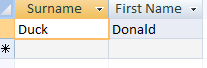
                Using "D"